> ## Documentation Index
> Fetch the complete documentation index at: https://docs.drdroid.io/llms.txt
> Use this file to discover all available pages before exploring further.
# Webhook Alerts
Send alerts directly to Doctor Droid from your monitoring systems via webhook integration.
## 🔗 Webhook Endpoint
**URL:** `https://playbooks.drdroid.io/alert-middleware/webhooks/alert/ingest`
**Method:** `POST`
**Content-Type:** `application/json`
## 🔐 Authentication
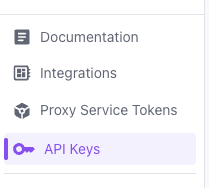
Use Bearer token authentication. Get your API token from the **API Keys** section in [aiops.drdroid.io](https://aiops.drdroid.io).
 **Header:** `Authorization: Bearer `
## 📝 Request Format
### Required Fields
| Field | Type | Description |
| --------------- | ------ | --------------------------------------------------- |
| `alert_title` | string | Concise description of the alert |
| `alert_message` | string | Detailed message or description |
| `severity` | string | `critical`, `warning`, `info` |
| `timestamp` | string | ISO 8601 timestamp (e.g., `"2024-01-15T10:30:00Z"`) |
### Optional Fields
| Field | Type | Description |
| ---------- | ------ | --------------------------------------------- |
| `source` | string | Source system (e.g., `"datadog"`, `"sentry"`) |
| `tags` | object | Key-value pairs for categorization |
| `metadata` | object | Additional context or data |
## 📋 Example Request
```bash theme={null}
curl -X POST "https://playbooks.drdroid.io/alert-middleware/webhooks/alert/ingest" \
-H "Authorization: Bearer " \
-H "Content-Type: application/json" \
-d '{
"alert_title": "Datadog Connection Failed",
"alert_message": "Unable to connect to Datadog",
"severity": "critical",
"timestamp": "2024-01-15T10:30:00Z",
"drd_alert_source": "Datadog"
}'
```
## 🔧 Platform Integrations
### NewRelic Setup
1. Go to **Alerts** > **Destinations** in the left sidebar
2. Click **Add a webhook destination**
3. Enter the webhook URL: `https://playbooks.drdroid.io/alert-middleware/webhooks/alert/ingest`
4. Set **Authentication Type** to **Bearer Token**
5. Enter your API token
6. Add this destination to your alert policies alongside existing alerting systems
**Coralogix:**
1. Click on the **Data Flow** dropdown in the top menu bar
2. Select **Outbound Webhooks**
3. Create a generic webhook with POST method
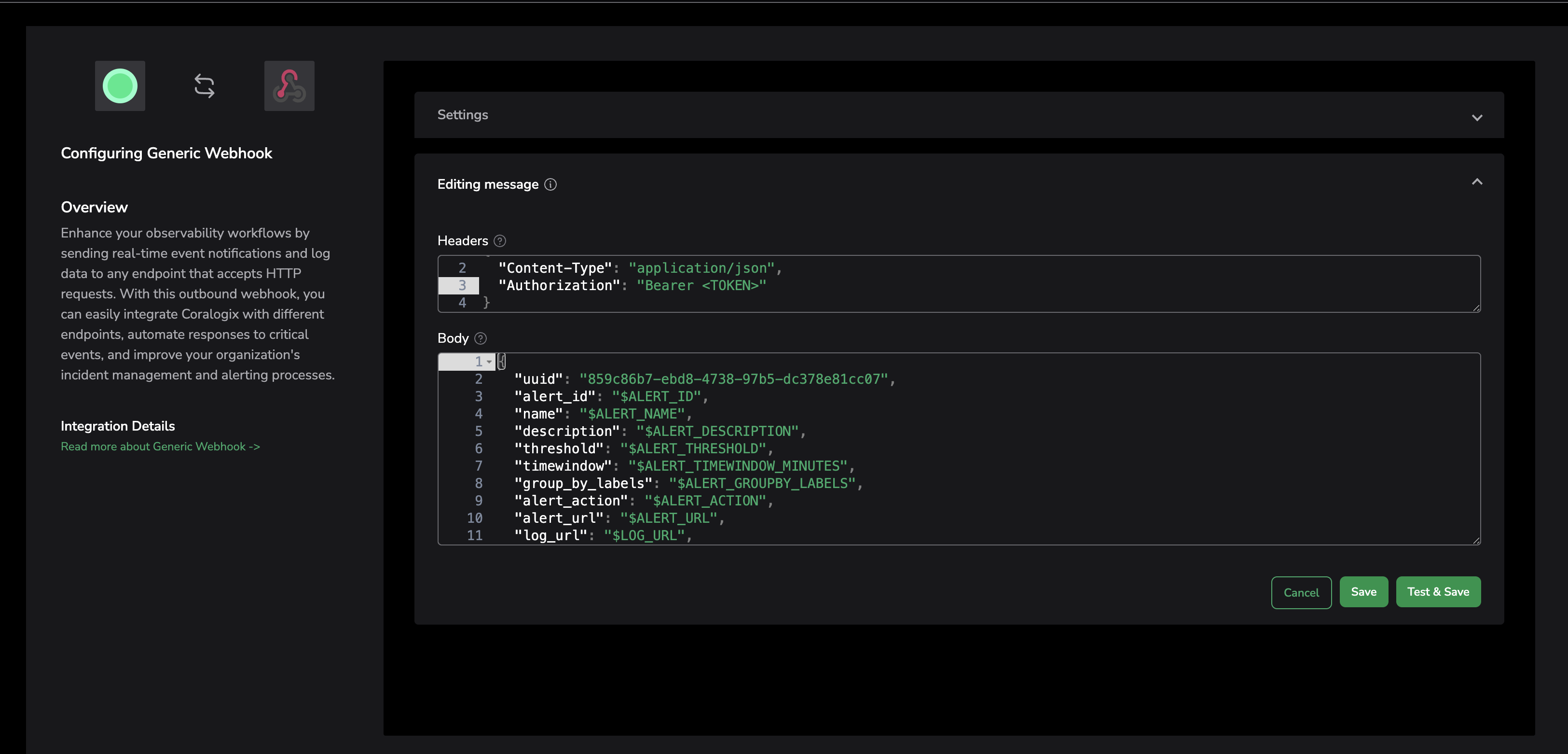
4. In the editing message section, add the authorization token as shown below:
**Header:** `Authorization: Bearer `
## 📝 Request Format
### Required Fields
| Field | Type | Description |
| --------------- | ------ | --------------------------------------------------- |
| `alert_title` | string | Concise description of the alert |
| `alert_message` | string | Detailed message or description |
| `severity` | string | `critical`, `warning`, `info` |
| `timestamp` | string | ISO 8601 timestamp (e.g., `"2024-01-15T10:30:00Z"`) |
### Optional Fields
| Field | Type | Description |
| ---------- | ------ | --------------------------------------------- |
| `source` | string | Source system (e.g., `"datadog"`, `"sentry"`) |
| `tags` | object | Key-value pairs for categorization |
| `metadata` | object | Additional context or data |
## 📋 Example Request
```bash theme={null}
curl -X POST "https://playbooks.drdroid.io/alert-middleware/webhooks/alert/ingest" \
-H "Authorization: Bearer " \
-H "Content-Type: application/json" \
-d '{
"alert_title": "Datadog Connection Failed",
"alert_message": "Unable to connect to Datadog",
"severity": "critical",
"timestamp": "2024-01-15T10:30:00Z",
"drd_alert_source": "Datadog"
}'
```
## 🔧 Platform Integrations
### NewRelic Setup
1. Go to **Alerts** > **Destinations** in the left sidebar
2. Click **Add a webhook destination**
3. Enter the webhook URL: `https://playbooks.drdroid.io/alert-middleware/webhooks/alert/ingest`
4. Set **Authentication Type** to **Bearer Token**
5. Enter your API token
6. Add this destination to your alert policies alongside existing alerting systems
**Coralogix:**
1. Click on the **Data Flow** dropdown in the top menu bar
2. Select **Outbound Webhooks**
3. Create a generic webhook with POST method
4. In the editing message section, add the authorization token as shown below:
 **Grafana:**
1. In the left menu bar, go to **Alerting** > **Contact Points**
2. Click **Create Contact Point**
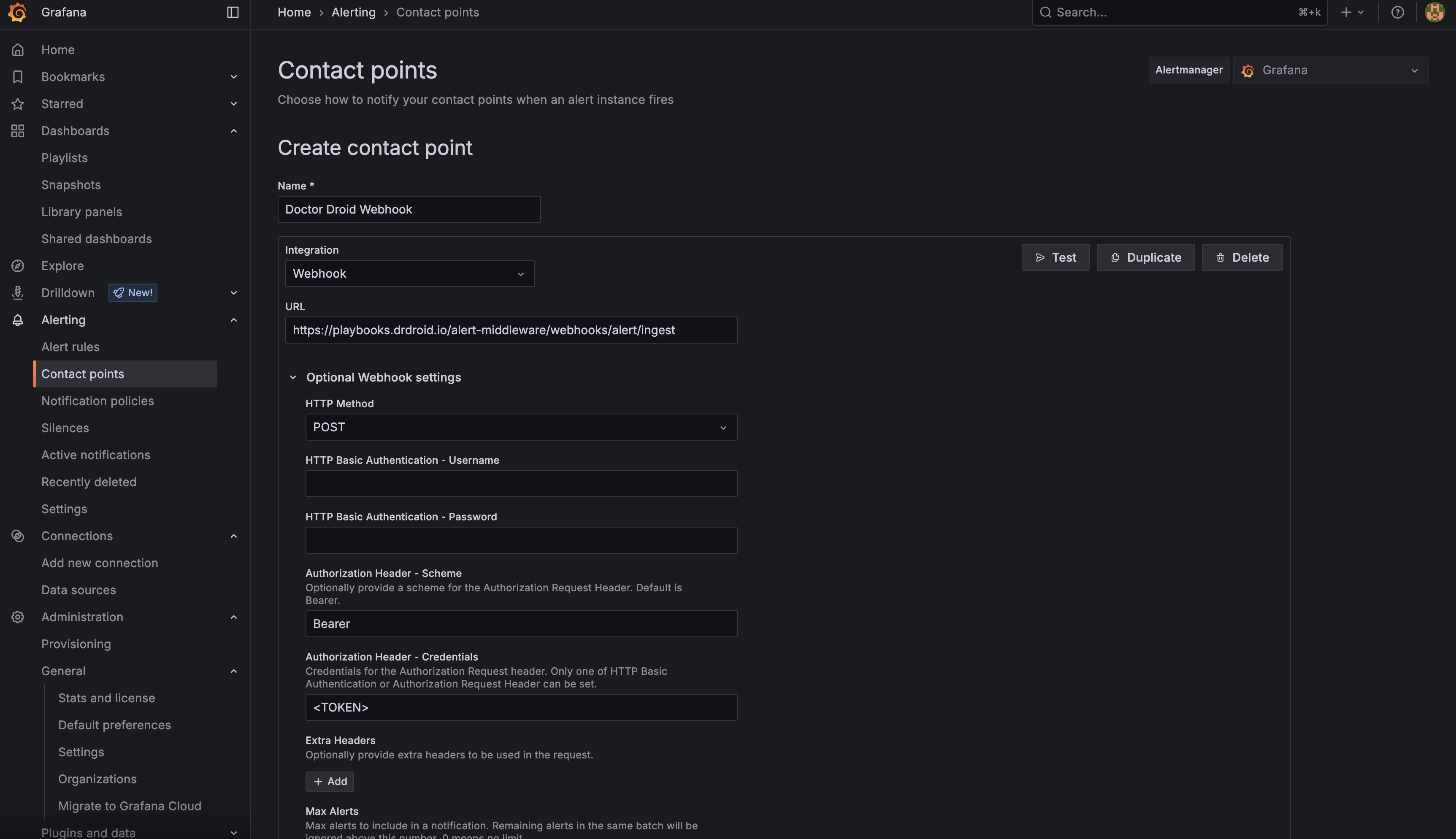
3. Add webhook with configuration similar to the screenshot below
4. It is mandatory to set the optional webhook settings in Grafana as shown in the screenshot
5. Save the contact point
**Grafana:**
1. In the left menu bar, go to **Alerting** > **Contact Points**
2. Click **Create Contact Point**
3. Add webhook with configuration similar to the screenshot below
4. It is mandatory to set the optional webhook settings in Grafana as shown in the screenshot
5. Save the contact point
 **Sentry:**
1. Go to **Settings** > **Integrations**
2. Click **Create New Integration** of type **Webhook**
3. Set method type as **POST**
4. Set authentication method as **Bearer Token**
**Datadog:**
1. Go to **Integrations** > **Webhooks**
2. Click **New Webhook**
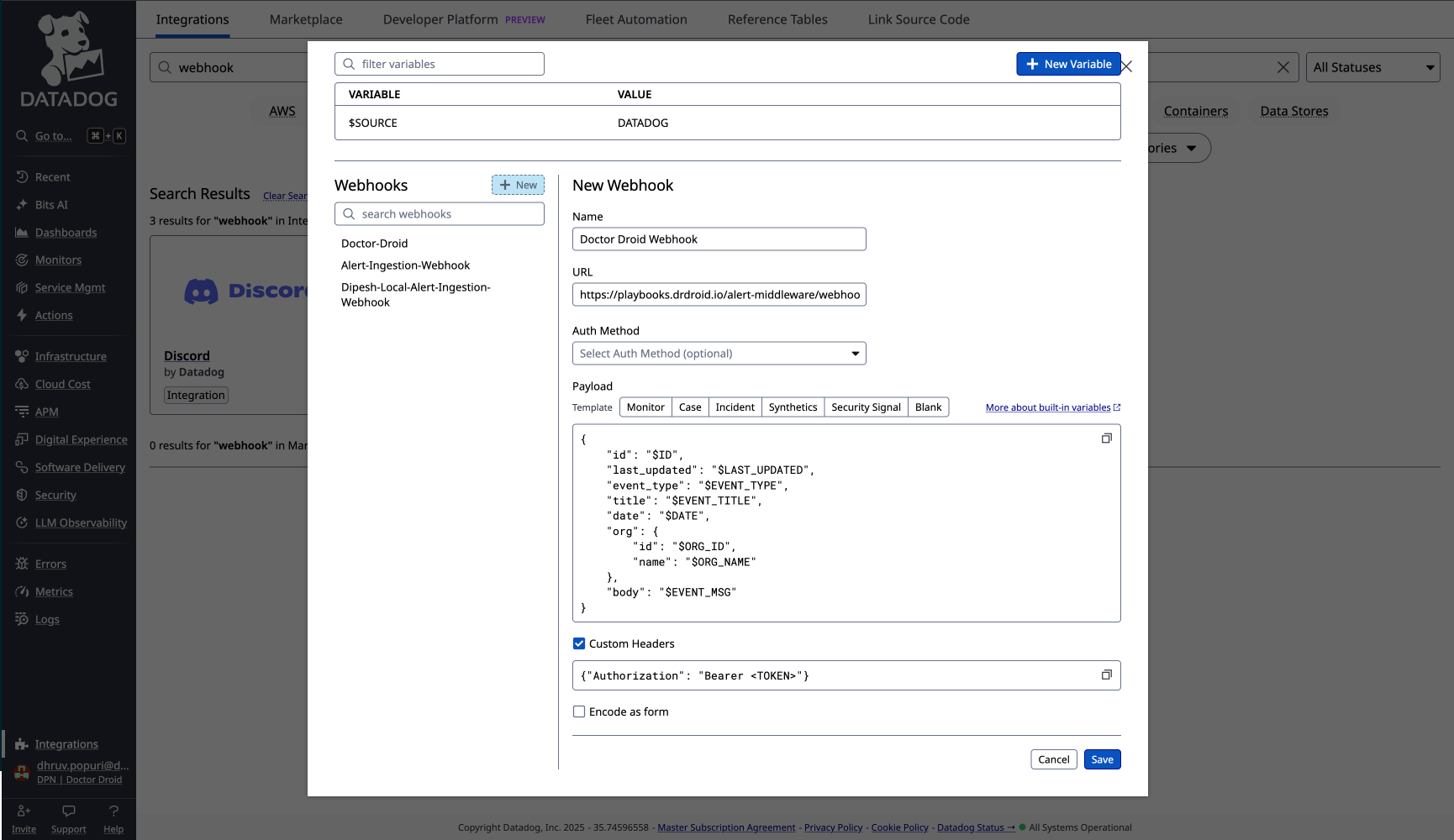
3. Configure the custom header to include the authorization bearer token as shown below:
**Sentry:**
1. Go to **Settings** > **Integrations**
2. Click **Create New Integration** of type **Webhook**
3. Set method type as **POST**
4. Set authentication method as **Bearer Token**
**Datadog:**
1. Go to **Integrations** > **Webhooks**
2. Click **New Webhook**
3. Configure the custom header to include the authorization bearer token as shown below:
 **Other platforms support Bearer token authentication natively:**
* **Elasticsearch** - Configure webhook with Bearer token authentication
## 📊 Response Codes
| Status Code | Description |
| ----------- | ------------------------------------------- |
| `200` | Alert successfully ingested |
| `400` | Bad request - invalid payload format |
| `401` | Unauthorized - invalid or missing API token |
| `429` | Rate limit exceeded |
| `500` | Internal server error |
## 📚 Related Documentation
* [Alerts Inbox](/monitor/alerts-inbox) - View and manage incoming alerts
* [Alert Details](/agent/alert-details) - Debug and analyze specific alerts
* [Integrations](/integrations/integrations) - Connect with monitoring tools and services
**Other platforms support Bearer token authentication natively:**
* **Elasticsearch** - Configure webhook with Bearer token authentication
## 📊 Response Codes
| Status Code | Description |
| ----------- | ------------------------------------------- |
| `200` | Alert successfully ingested |
| `400` | Bad request - invalid payload format |
| `401` | Unauthorized - invalid or missing API token |
| `429` | Rate limit exceeded |
| `500` | Internal server error |
## 📚 Related Documentation
* [Alerts Inbox](/monitor/alerts-inbox) - View and manage incoming alerts
* [Alert Details](/agent/alert-details) - Debug and analyze specific alerts
* [Integrations](/integrations/integrations) - Connect with monitoring tools and services