DrDroid connects to Google BigQuery using a GCP service account. DroidAgent can list datasets, read table metadata, and run SQL queries when investigating alerts.
This is a separate connector from Google Cloud Platform (GCP) and Google Cloud Metrics & Logs. Add BigQuery only if you want the agent to query warehouse tables directly.
Connection via dashboard
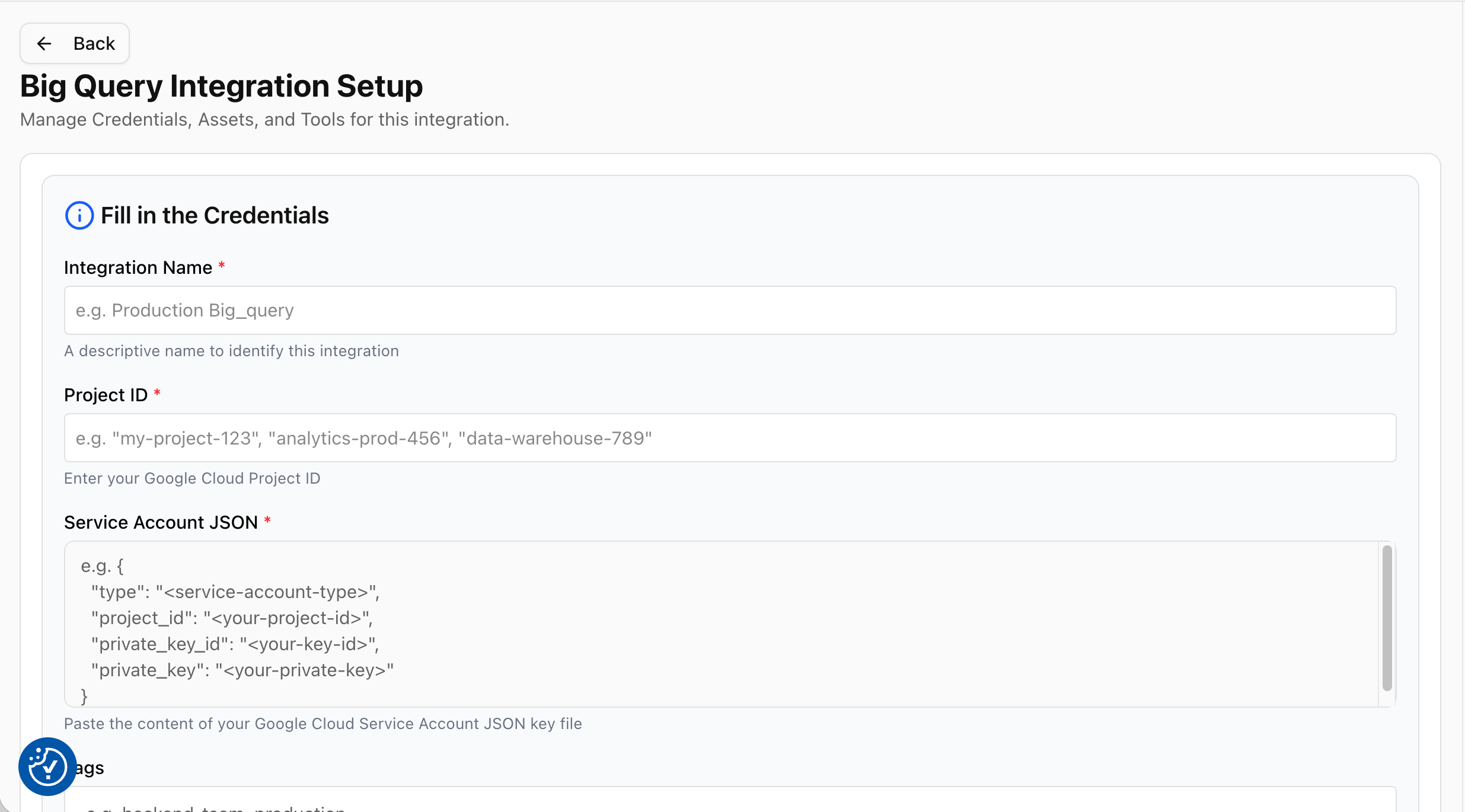
Open Agent Setup → Integrations → BigQuery, or go to aiops.drdroid.io/integrations/big_query.
On Big Query Integration Setup, fill in:
| Field | Description |
|---|
| Integration Name | A label for this connector (e.g. Production BigQuery). |
| Project ID | Your Google Cloud project ID (e.g. my-project-123). Must match the project in your service account JSON. |
| Service Account JSON | Paste the entire JSON key file from GCP. Include all fields (type, project_id, private_key, client_email, etc.). Do not paste only the private key. |
Click Test connection, then Save.
Test connection checks that DrDroid can authenticate and list at least one dataset in the project. If the project has no datasets, or the service account cannot see any, the test fails even when the JSON is valid.
Create a service account
- In Google Cloud Console, go to IAM & Admin → Service Accounts.
- Create a service account (e.g.
drdroid-bigquery-reader).
- Create a JSON key: Keys → Add key → Create new key → JSON. Download and store it securely.
Required IAM roles
Grant these on the GCP project (or tighter, as described below):
| Role | ID | Why |
|---|
| BigQuery Job User | roles/bigquery.jobUser | Run queries (creates query jobs). |
| BigQuery Data Viewer | roles/bigquery.dataViewer | Read table data and list datasets the account can access. |
Example (project-wide, simplest setup):
export PROJECT_ID="your-project-id"
export SA_EMAIL="drdroid-bigquery-reader@${PROJECT_ID}.iam.gserviceaccount.com"
gcloud projects add-iam-policy-binding $PROJECT_ID \
--member="serviceAccount:${SA_EMAIL}" \
--role="roles/bigquery.jobUser"
gcloud projects add-iam-policy-binding $PROJECT_ID \
--member="serviceAccount:${SA_EMAIL}" \
--role="roles/bigquery.dataViewer"
Restrict access to specific datasets (recommended)
For least privilege, keep BigQuery Job User on the project, and grant BigQuery Data Viewer only on datasets the agent should use:
bq add-iam-policy-binding PROJECT_ID:DATASET_ID \
--member="serviceAccount:${SA_EMAIL}" \
--role="roles/bigquery.dataViewer"
Replace PROJECT_ID and DATASET_ID with your values. Repeat for each dataset. The service account must still be able to see at least one dataset for the connection test to pass.
Enable the BigQuery API
gcloud services enable bigquery.googleapis.com --project=$PROJECT_ID
Querying
After the connector is saved, DroidAgent can run BigQuery SQL during investigations (read-only SELECT queries against datasets you granted access to).